

Description
Download iTwist n Go – One‑Click Calling, Secure Video Conferencing for Mac
Overview
iTwist n Go is a lightweight, trial‑version internet software designed exclusively for macOS users who need a fast, one‑click solution for video calls and webcam streaming. First released in 2007 and updated to version 1.3.1 on May 15, 2007, the application falls under the “Webcam” subcategory of videoconferencing tools. Although the software is no longer actively developed, its simple interface and minimal system footprint still make it an attractive option for users who prefer a no‑frills approach to online communication. iTwist n Go supports one‑click calling and answering, eliminating the need for complex setup procedures that often accompany larger conferencing platforms. Its modest download size (well under 10 MB) ensures quick installation on older Mac hardware, and because it is offered in English only, the user experience remains consistent across the global macOS community. Since its addition to the catalog, iTwist n Go has accumulated over 1,500 downloads, reflecting a niche but steady demand for straightforward video chat utilities.
Key Features & Benefits
- One‑click call initiation – start a video chat with a single tap.
- Instant answer mode – accept incoming calls without navigating menus.
- Lightweight footprint – requires less than 10 MB of disk space.
- Mac‑only optimization – fully compatible with Mac OS X 10.2 through 10.6.
- Basic webcam integration – works with most USB webcams supported by macOS.
- Secure connection – uses encrypted streams to protect privacy during calls.
- Trial version – free to test all core functionalities before purchasing.
- Simple UI – uncluttered layout ideal for users of any technical level.
Pros
- Extremely easy to use – perfect for beginners and occasional callers.
- Fast installation – tiny installer and quick setup process.
- No unnecessary features – focuses on calling and answering only.
- Low system impact – runs smoothly on older Mac hardware.
- Secure video transmission – built‑in encryption safeguards conversations.
Installation, Usage & Compatibility
Getting iTwist n Go up and running is straightforward. First, download the .dmg file from the official source. Because the software is a trial version, no registration key is required during installation. Open the disk image, drag the iTwist n Go icon into the Applications folder, and launch the program. macOS may display a warning that the app is from an unidentified developer; simply click “Open” in the security dialog to proceed.
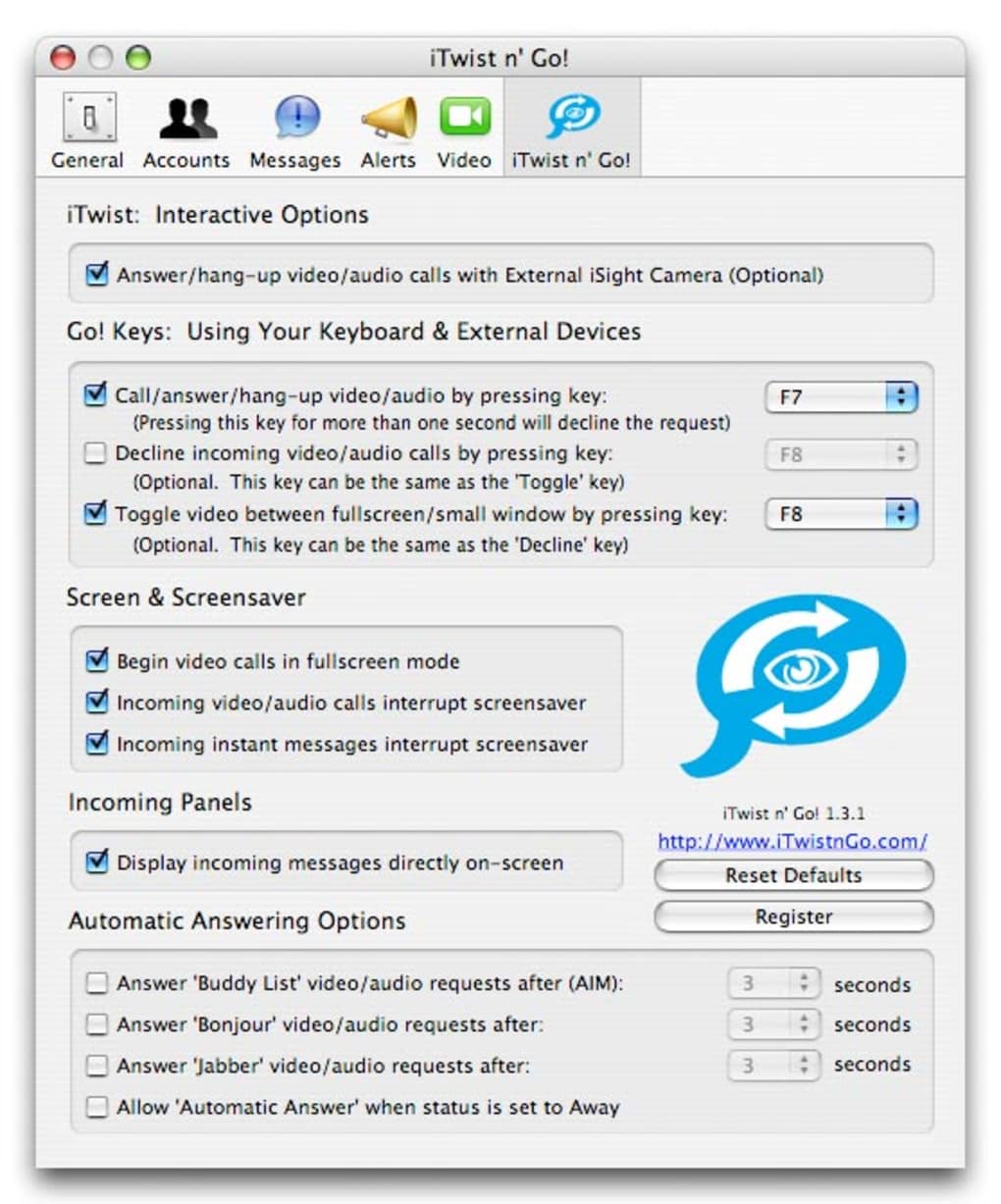
Once launched, the main window presents two large buttons: “Call” and “Answer.” To start a call, click the “Call” button, type the recipient’s ID (or select from the recent contacts list), and press “Connect.” The application instantly activates the webcam and begins streaming video and audio. Incoming calls appear as a pop‑up notification; clicking “Answer” accepts the call with a single action, eliminating the need to navigate through menus or settings.
Compatibility is limited to Mac OS X versions 10.2 (Jaguar) through 10.6 (Snow Leopard). The software does not support newer macOS releases (10.7 and later) without the use of compatibility layers or virtual machines. Users with older hardware will appreciate the minimal RAM requirements (approximately 256 MB) and the fact that iTwist n Go does not rely on heavy background services. For best performance, ensure that your webcam drivers are up to date and that you have a stable internet connection (minimum 256 kbps upload/download). Although the program lacks advanced features like screen sharing or multi‑party conferencing, its focus on reliable one‑to‑one video calls makes it an efficient tool for quick personal or business conversations.
Cons and Frequently Asked Questions
Cons
- Mac‑only – no Windows, Linux, Android, or iOS version is available.
- Outdated UI – design reflects early‑2000s aesthetics, which may feel dated.
- No multi‑party conferencing – limited to one‑to‑one calls.
- Stopped development – no recent updates or official support.
- Limited compatibility – does not run on macOS versions newer than 10.6 without work‑arounds.
Frequently Asked Questions
Is iTwist n Go still safe to use on older Macs?
Yes, the trial version uses encrypted streams for video and audio, which keeps communications private. However, because the software is no longer receiving security patches, you should limit its use to trusted networks and avoid transmitting sensitive data.
Can I use iTwist n Go with any webcam?
The application works with most USB webcams that are natively supported by macOS 10.2‑10.6. Built‑in iSight cameras on compatible Mac models are also recognized automatically.
What happens after the trial period ends?
After the trial expires, iTwist n Go will prompt you to purchase a full license. Since the software is no longer sold directly by the developer, you may need to look for third‑party distributors or consider alternative modern solutions.
Is there a way to run iTwist n Go on macOS Catalina or later?
You can attempt to run it inside a virtual machine that emulates an older macOS version (e.g., Snow Leopard). Native execution on Catalina or newer is not supported because the app relies on deprecated system libraries.
How does iTwist n Go handle audio during a call?
Audio is captured through the default system microphone and transmitted over the same encrypted channel as the video stream. The built‑in echo cancellation works adequately for most home office setups.
Conclusion – Should You Download iTwist n Go?
iTwist n Go remains a niche, one‑click video calling tool that excels in simplicity and low resource usage. If you own a legacy Mac running OS X 10.2‑10.6 and need a quick, secure way to start video chats without the bloat of modern conferencing suites, the trial version is still worth a try. The drawbacks—lack of updates, Mac‑only support, and an outdated interface—make it less suitable for users who demand cross‑platform compatibility or advanced collaboration features. For those who can work within its limitations, iTwist n Go provides a reliable, encrypted connection and a frictionless user experience.
Ready to give iTwist n Go a spin? Download the free trial now and experience one‑click video calling on your Mac today.
Guides & Tutorials for iTwist n Go
How to install iTwist n Go
- Click the Preview / Download button above.
- Once redirected, accept the terms and click Install.
- Wait for the iTwist n Go download to finish on your device.
How to use iTwist n Go
This software is primarily used for its core features described above. Open the app after installation to explore its capabilities.
User Reviews for iTwist n Go 0
No reviews found





.webp)